Category: X Virtual Assistants

  • Scaling with Offshore Talent: 8 Quick-Read Tips

    Scaling with Offshore Talent: 8 Quick-Read Tips

    Scaling with Offshore Talent: 8 Quick-Read Tips

    Scaling With Offshore talent
    Scaling With Offshore talent

    Expanding your team by scaling with offshore talent can unlock rapid growth, cost savings, and productivity gains. These 8 concise tips show you how to integrate full-time X Virtual Assistants seamlessly—turning your offshore hires into high-impact extensions of your in-house team.


    1. Start with One Full-Time XVA

    Hire a dedicated XVA at a flat rate of $1,975/month. This ensures your assistant works full-time on your U.S. time zone—no part-time shifts or split schedules.


    2. Ensure 100% Time-Zone Alignment

    Your XVA’s schedule is set to match your business hours exactly. Specify your core hours when you schedule a call, and we’ll assign an assistant whose shift fully overlaps with your operating window.


    3. Define Clear Expectations

    On Day 1, provide a concise brief outlining deliverables, deadlines, and preferred tools (e.g., Slack for messaging, Asana for tasks). Clear instructions accelerate onboarding and reduce back-and-forth.


    4. Embrace Asynchronous Communication

    Use Loom for quick, narrated screen-share videos that explain processes step by step. Your XVA can review these at any time—no need for constant live meetings.


    5. Standardize Your Processes

    Store all SOPs in your centralized XVA SOPs folder on Google Drive or Dropbox. Integrate these into your AI Copilot for on-demand guidance and consistent quality.


    6. Provide Cultural & Soft-Skills Orientation

    Host a brief kickoff call to cover company values, communication style, and client expectations. Regular feedback sessions help bridge any cultural or workflow gaps.


    7. Monitor Performance Transparently

    Track KPIs like task completion rates, response times, and quality scores. A simple weekly dashboard or email report keeps performance visible and actionable.


    8. Partner with X Virtual Assistants

    Our fully managed service delivers pre-vetted, AI-trained XVAs backed by a dedicated Client Success Manager. Learn more about our Perfect XVA Match Guarantee on our homepage.


    Ready to Scale with Offshore Talent?

    Follow these tips, then let X Virtual Assistants handle recruitment, training, and ongoing management—so you can focus on strategic growth.

    👉 Schedule Your Free Discovery Call

  • Delegate Effortlessly: SOP Guide for Hiring Your X Virtual Assistant

    Delegate Effortlessly: SOP Guide for Hiring Your X Virtual Assistant

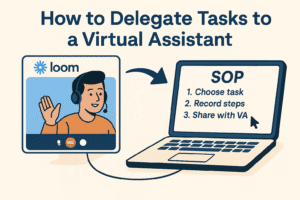
    How to delegate tasks to a virtual assistant
    How to delegate tasks to a virtual assistant

    Delegate Effortlessly: How to Delegate Tasks to a Virtual Assistant (SOP Guide)

    Learning how to delegate tasks to a virtual assistant can revolutionize your productivity, reclaiming 20+ hours every week. In this step-by-step SOP guide, discover how to record processes once, auto-generate clear SOPs, and empower your X Virtual Assistant (XVA) to take over seamlessly.


    1️⃣ Identify Tasks to Outsource

    Begin by listing the repetitive, time-draining tasks you want to offload—such as scheduling, weekly reporting, or content uploads. Choosing the right workflow is critical to successfully delegating to a VA.


    2️⃣ Record a Step-by-Step Workflow

    • Log into Loom, click New Video → Screen + Cam, and narrate each action.

    • Speak clearly so your assistant can follow along.

    This Loom recording becomes the foundation of your SOP, showing exactly how to assign tasks to your XVA.


    3️⃣ Generate SOPs with Loom AI

    • Open your Loom video, click the AI button, and select Create SOP.

    • Instantly receive a structured, time-stamped document with headings and bullet points—ready for review.


    4️⃣ Review & Customize Your SOP

    • Copy the AI draft into Google Docs, Dropbox, or OneDrive.

    • Add branding, links, or additional notes.

    • Ensure every step is crystal clear—so your XVA follows it verbatim.


    5️⃣ Organize and Share in the Cloud

    • Create an “XVA SOPs” folder on your preferred cloud drive.

    • Save SOPs and Loom links there, granting your assistant view/edit access.

    • Use version control to keep documentation up to date.

    This centralized library makes it effortless to remember exactly how to delegate tasks to a virtual assistant every time.


    6️⃣ Integrate SOPs with Your AI Copilot

    • Share your “XVA SOPs” folder link with our team.

    • We upload each document into your personalized AI Copilot—a smart knowledge base exclusive to your business.

    • Whenever your XVA needs guidance, they query the Copilot and get instant, context-aware instructions.


    7️⃣ Onboard Your X Virtual Assistant

    • Schedule a Free Discovery Call to outline your needs.

    • We match you with a dedicated, full-time XVA in 24–72 hours—trained on your SOPs and AI Copilot.

    • As your business scales, record new processes and watch your assistant take on more responsibilities seamlessly.

  • Virtual Assistant vs In-House Employee: Cost & ROI Comparison for U.S. Businesses

    Virtual Assistant vs In-House Employee: Cost & ROI Comparison for U.S. Businesses

    As U.S. business owners face rising payroll, benefits, and overhead expenses, a crucial question keeps coming up:
    Should I hire a virtual assistant vs employee for my growing business?

    For many companies, hiring an in-house employee is no longer the most cost-effective solution. In this complete cost comparison guide, you’ll see why more U.S. businesses are shifting toward hiring a fully managed virtual assistant instead of a full-time employee — and how it can dramatically improve your ROI.


    💰 1. Cost Breakdown: Virtual Assistant vs Employee

    ExpenseIn-House EmployeeVirtual Assistant (XVA)
    Base Salary$50,000/year (~$4,167/mo)$23,700/year ($1,975/mo)
    Benefits & Payroll Taxes$10,000/year (20–30%)$0
    Office Space & Overhead$6,000/year$0
    Equipment & Supplies$1,200/year$0 (included)
    Total Annual Cost$67,200/year$23,700/year

    Key Insight:
    ✅ Hiring a virtual assistant vs employee through X Virtual Assistants saves U.S. businesses approximately 65% in total costs — resulting in over $43,500/year in savings.


    📈 2. ROI Analysis: Virtual Assistant vs Employee

    When you compare a virtual assistant vs employee, the real value extends far beyond salary savings:

    🔄 Cost Flexibility:

    VAs scale up or down easily based on business needs. No wasted payroll during slow periods.

    🚀 Productivity Boost:

    XVA’s AI-powered assistants perform tasks faster and more accurately — delivering up to 13% higher productivity compared to traditional employees.

    ⏱ Minimal Management Required:

    • We handle recruitment, training & replacements.

    • You focus on growing your business, not managing staff.


    💡 3. Real-World Scenario: Virtual Assistant vs Employee for Marketing

    In-House Marketing AssistantX Virtual Assistants Marketing VA
    Monthly Cost$4,167 + benefits$1,975 flat
    Time-to-Hire4–6 weeks24–72 hours
    AI ToolsLimitedFully included
    Management OverheadHighMinimal

    Monthly Savings: Over $2,192/month
    Faster Onboarding: VA ready within 24–72 hours
    AI Productivity: Boosts deliverables with custom GPT Copilot


    ⚠ 4. Hidden Risks: Virtual Assistant vs Employee

    When comparing a virtual assistant vs employee, don’t forget these hidden in-house costs:

    • Recruiting Costs: $4,000+

    • Turnover Replacement: 33% of salary (~$16,500)

    • Training Time: You lose valuable management time

    • HR Compliance: Payroll filings, taxes, benefits, legal liabilities

    With X Virtual Assistants, these risks are eliminated.


    🎯 5. Conclusion: Virtual Assistant vs Employee — The Smarter ROI

    Hiring a virtual assistant vs employee offers:

    • ✅ Lower costs (65% savings)

    • ✅ Immediate productivity

    • ✅ Zero recruitment & HR headaches

    • ✅ Fully trained, AI-empowered VA within 24 hours

    This is why hundreds of U.S. business owners are shifting to fully managed virtual assistants through X Virtual Assistants.

    👉 Schedule Your Free Discovery Call
    Have your Virtual Assistant fully trained and operational in as little as 24–72 hours.

  • 10 Signs Your Business Needs a Virtual Assistant (And How to Get Started)

    10 Signs Your Business Needs a Virtual Assistant (And How to Get Started)

    Running a successful business means juggling countless tasks — emails, scheduling, customer support, data entry, social media, reporting, research, and more. At some point, though, these routine duties begin pulling you away from what you do best: growing your business.

    The problem isn’t doing the work — it’s spending precious hours doing work that can (and should) be delegated.

    If you recognize even a few of these 10 warning signs, it’s a strong signal that your business is ready to bring in a Virtual Assistant. And better yet — you don’t have to do it alone. We’ll show you exactly how to get started with a fully-vetted, AI-powered VA through X Virtual Assistants.


    🔎 1. You’re Spending 20+ Hours a Week on Administrative Tasks

    📉 Why it matters:
    Every hour you spend inside your inbox, scheduling meetings, or organizing spreadsheets is an hour you’re not closing deals, developing products, or building your brand.

    The smarter way:
    A fully trained X Virtual Assistant can reclaim 20+ hours/week instantly by handling these time-consuming admin tasks with precision.


    🔎 2. Your Inbox Is Never Truly “Zero”

    📉 Why it matters:
    Missed emails = missed revenue opportunities.

    The smarter way:
    Your VA can triage inboxes, handle routine inquiries, and escalate important emails quickly — giving you peace of mind that nothing slips through the cracks.


    🔎 3. You’re Missing or Double-Booking Appointments

    📉 Why it matters:
    Appointment mistakes cost credibility and revenue.

    The smarter way:
    Your VA can manage your calendar seamlessly, using tools like Google Calendar and Calendly to prevent costly scheduling errors.


    🔎 4. Customer Inquiries Go Unanswered for Days

    📉 Why it matters:
    Slow responses lead to lost customers.

    The smarter way:
    Your VA can handle chats, emails, and calls—keeping customer satisfaction and retention high.


    🔎 5. Routine Social Media Tasks Are Neglected

    📉 Why it matters:
    Inconsistent posting hurts brand awareness.

    The smarter way:
    A trained VA can schedule content, monitor engagement, and keep your social channels active — without you having to lift a finger.


    🔎 6. You Struggle to Keep Up with Data & Reports

    📉 Why it matters:
    Without timely reports, you’re flying blind.

    The smarter way:
    Your VA can compile and analyze data weekly, giving you actionable insights to make better decisions faster.


    🔎 7. Research Projects Take Forever

    📉 Why it matters:
    Lead generation, competitor analysis, or supplier research shouldn’t consume your entire day.

    The smarter way:
    Delegate research to your VA and receive detailed reports ready for quick decision-making.


    🔎 8. You Don’t Have Time to Write or Edit Content

    📉 Why it matters:
    Poor content slows marketing and sales.

    The smarter way:
    Your VA can draft blogs, proposals, emails, and newsletters — all aligned with your brand voice and reviewed before publishing.


    🔎 9. You Have No Backup When You’re Away

    📉 Why it matters:
    Even business owners deserve time off.

    The smarter way:
    Your VA ensures operations continue smoothly when you’re offline — whether you’re on vacation or handling personal matters.


    🔎 10. You’re Feeling Burnt Out or Distracted

    📉 Why it matters:
    Burnout hurts both you and your business.

    The smarter way:
    With an X Virtual Assistant on your team, you finally focus on high-level strategy while your VA handles the busywork.


    🚀 How to Get Started: The 5-Step Fast Track

    1️⃣ Identify Priority Tasks

    Start with the top 3–5 items you’d love to stop doing — whether that’s inbox management, scheduling, customer service, or content creation.

    2️⃣ Choose the Right VA Path

    • Freelancers (Upwork, Fiverr): Low cost upfront but time-consuming to vet, train, and manage.

    • X Virtual Assistants: Fully managed, pre-vetted, AI-trained VAs matched to your business within 24–72 hours.

    3️⃣ Create a Job Brief

    We’ll help you define job roles, responsibilities, required tools, and success benchmarks.

    4️⃣ Interview & Test (If DIY)

    Or skip this entirely — we handle screening, testing, and matching for you.

    5️⃣ Onboard & Set Milestones

    With X Virtual Assistants, we fully onboard your VA, build out your AI Copilot, and set clear 30/60/90-day milestones for measurable ROI.


    ✅ Conclusion: Don’t Wait for Burnout

    If you recognize even one or two of these signs, your business is ready for a Virtual Assistant. The only question is whether you want to spend weeks (or months) trying to hire and train one yourself — or skip the headaches entirely.

    👉 Schedule your Free Discovery Call and have your fully trained, AI-powered VA running within 24–72 hours — risk-free with our Perfect Match Guarantee.


  • How to Hire a Virtual Assistant in 2025: The Ultimate Step-by-Step Guide (Without the Headache)

    How to Hire a Virtual Assistant in 2025: The Ultimate Step-by-Step Guide (Without the Headache)

    Hiring a Virtual Assistant (VA) can instantly reclaim 20+ hours of your week, boost your productivity, and finally get you out of the weeds in your business. But let’s be honest: the process of finding, screening, training, and managing a VA can feel overwhelming and time-consuming — especially if you’re trying to do it all on your own.

    The reality is: hiring a VA the right way takes careful planning, patience, and expertise — unless you have a partner who handles it for you.

    In this comprehensive 2025 guide, we’ll break down the step-by-step process of hiring a virtual assistant — and why many business owners choose a done-for-you solution like X Virtual Assistants to avoid the trial-and-error headache altogether.


    1️⃣ Step 1: Define Your Needs and Budget

    Before you hire anyone, start by auditing your day:

    • List your time-wasters: Email triage, calendar management, data entry, follow-ups.

    • Prioritize: Rank tasks by how much time they consume and how critical they are.

    • Set a realistic budget: General freelancers may charge $15–$25/hr, but with hidden costs like training, turnover, and replacements. Fully-managed solutions like X Virtual Assistants offer trained, AI-empowered VAs starting at just $1,975/month with no long-term contracts.

    👉 The Hidden Cost of DIY Hiring: Many founders underestimate how much time goes into vetting, interviewing, training, and managing VAs. A few “cheap” mistakes can quickly outweigh any initial savings.


    2️⃣ Step 2: Choose Between Freelancer or Managed VA Agency

    Freelancer Platforms:
    Sites like Upwork or Fiverr offer a huge pool of candidates—but that also means you’re responsible for:

    • Writing job posts

    • Sorting through dozens of applications

    • Conducting interviews

    • Performing background checks

    • Managing time zones, training, and performance reviews

    Managed Virtual Assistant Agencies:
    At X Virtual Assistants, we simplify everything:

    • 5-Layer Vetting Process

    • Top 1% Filipino VA talent

    • Custom AI GPT Copilot trained on your business

    • Client Success Manager assigned to every account

    • Month-to-month flexibility with a Perfect-Fit Guarantee

    👉 For most business owners, the agency route saves 50–100+ hours upfront while delivering a significantly better long-term outcome.


    3️⃣ Step 3: Create a Crystal-Clear Job Brief

    The more specific you are, the better match you’ll attract:

    • Job Title & Summary: “Executive Virtual Assistant: Calendar, Email & Project Management”

    • Responsibilities: List 5–8 core daily tasks

    • Skills Required: Google Workspace, CRMs, Asana, excellent written English, problem-solving

    • Schedule: Clarify your working hours, time zone expectations, and tools (Slack, Zoom, etc.)

    • Application Screening: Ask qualifying questions upfront to filter weak candidates

    At X Virtual Assistants, we help you craft this job brief as part of our client intake—ensuring your VA is fully aligned before they even start.


    4️⃣ Step 4: Screen, Test & Interview Candidates

    The DIY Process:

    • Review resumes & portfolios

    • Conduct structured interviews (behavioral + technical)

    • Assign a paid test project

    • Verify availability and communication skills

    The Managed Process (Done-for-You):

    • Pre-vetted candidates already matched to your needs

    • Soft skills, hard skills, and culture fit already assessed

    • Fully-trained on your business before they start

    👉 One of the biggest reasons businesses choose X Virtual Assistants is to avoid this exact stage, which can often take 4–8 weeks when done alone.


    5️⃣ Step 5: Make the Offer & Set Clear Expectations

    Whether you hire directly or through an agency, always include:

    • Start date, pay structure, working hours

    • Tools and login credentials

    • Training schedule and SOPs

    • Communication norms: daily check-ins, weekly reviews, escalation paths

    Bonus: At X Virtual Assistants, your dedicated Success Manager ensures this entire process is handled professionally, creating a frictionless launch experience.


    6️⃣ Step 6: Onboard Your VA for Long-Term Success

    DIY Onboarding:

    • Schedule kickoff meetings

    • Create SOPs and documentation (can take weeks)

    • Set 30, 60, 90-day KPIs

    • Monitor and adjust performance regularly

    X Virtual Assistants Onboarding:

    • We build your SOPs & AI GPT Copilot during onboarding

    • Immediate task delegation starting day one

    • Dedicated Client Success Manager monitors progress

    • Weekly reporting with built-in KPIs

    👉 You don’t need to spend weeks building training manuals — we handle the heavy lifting for you.


    7️⃣ Step 7: Manage Performance, Provide Feedback & Scale

    • Weekly 15-min check-ins

    • Use data: response time, tasks completed, hours saved

    • Provide clear feedback and celebrate wins

    • Gradually delegate higher-level tasks

    With X Virtual Assistants, you’re never alone — our Success Team ensures your VA remains productive, engaged, and improving month after month.


    ✅ Conclusion: The Smarter Way to Hire a Virtual Assistant in 2025

    While hiring a Virtual Assistant can be done yourself, it often requires weeks (or months) of sourcing, interviewing, training, and managing — with no guarantees.

    That’s why more U.S. business owners are partnering with agencies like X Virtual Assistants to shortcut the process, eliminate costly hiring mistakes, and get fully trained, AI-powered VAs launched within 24–72 hours.

    👉 Book Your Free Discovery Call Here and start reclaiming 20+ hours of your week as early as next week.